Store Credit in the Customer Account
Store Credit adds a Store Credit page to My Account, reachable from the account navigation and from the balance link in the header account menu. It answers the two questions a customer has: how much can I spend, and where did it come from.
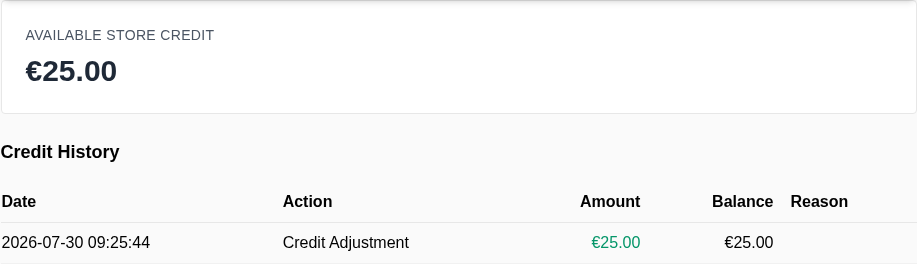
The page lives at store-credit/account (storecredit/account before Store Credit 2.0.0) and is never page-cached, so the balance a customer sees is always the current one.
Available Store Credit
The top of the page shows the customer's spendable balance for the website they are browsing, formatted in that website's base currency. A customer who shops on two of your websites has two separate balances and sees only the one belonging to the current website.
If store credit is disabled for the website, the page redirects to the account dashboard rather than showing an empty balance. Guests who follow a link to the page are sent to login first and land back on the Store Credit page once they sign in.
Credit History
Below the balance, the credit history table lists the most recent 50 ledger entries for that customer, newest first. Entries that did not move the balance are left out. Each row shows four things plus a reason:
- Date - when the entry was written.
- Action - what kind of change it was, as a plain label.
- Amount - the signed amount, colored green when credit came in and red when it went out.
- Balance - the balance immediately after that entry, so the customer can follow the running total down the page.
- Reason - the customer-facing explanation, if there is one.
Action Labels in the History
The Action column translates the ledger event type into wording a customer can read:
| Label | What happened |
|---|---|
| Credit Adjustment | An admin user or an integration added credit. |
| Debit Adjustment | An admin user or an integration removed credit. |
| Spent | Credit was used to pay for an order. |
| Refunded | Credit came back from a credit memo. |
| Reverted | Credit came back because an order was canceled or its payment failed. |
| Converted | Credit came from converting something else, such as a gift card. |
| Imported | The balance was seeded by a CSV import. |
What the Reason Column Shows
Every ledger entry can carry two reasons, and only one of them is ever shown here. The internal reason is required on admin adjustments and is written for colleagues, so it stays in the admin. The external reason is optional and is written for the customer, so it is what appears in this column and in the balance change emails.
When an entry has no external reason, the column falls back to the reference the entry belongs to, so a spend still reads as the order it paid for rather than as a blank cell. Entries tied to an order also link through to that order in My Account.
Hiding the History
The history table can be switched off per website with Show Store Credit History in Customer Account under Stores → Settings → Configuration → Hyvä Commerce → Store Credit. The balance stays visible; only the table disappears. The GraphQL history query returns an empty result for that website too, so a headless storefront honors the same setting. See Configuring Store Credit.
Related Topics
- Spending Store Credit - applying and removing credit in the cart and in checkout.
- Balance Change Emails - the emails that announce the entries shown in this history.
- Store Credit GraphQL API - the same balance and history for headless storefronts.