Store Credit Through the Order Lifecycle
Applying store credit in the cart does not touch the customer's balance. The balance only moves when an order moves, and Store Credit hooks into the order lifecycle to keep the ledger and the order in agreement. This page walks through what happens at each of them.
Order Placement Debits the Balance
When the order is submitted, Store Credit copies the applied amount from the quote onto the order and writes a Spent entry to the ledger with a negative amount. From that moment the customer's balance is genuinely lower, and the order carries base_store_credit_amount and store_credit_amount for the rest of its life.
The entry records where the order came from. A customer checking out on the storefront produces an entry with source checkout; an order placed by an admin user in the admin panel produces source admin along with the admin user's ID, so the audit trail shows who placed it.
A Failed Payment Reverts the Balance
If order submission fails after the balance was debited, Store Credit writes a Reverted entry that puts the amount straight back. The customer is not left short because a payment gateway timed out.
This is the part that has to be exactly right, because a customer whose card is declined will simply try again. Store Credit handles retries with idempotency keys: the spend for an order is keyed on the order's increment ID, and each retry raises an attempt counter stored on the quote, so the second attempt writes a genuinely new entry instead of colliding with the first. A duplicate failure notification arriving after the order was in fact placed is ignored, so credit is never refunded twice for the same order.
Cancellation Reverts What Is Left
Canceling an order writes a Reverted entry for the credit that has not already come back through a refund: the amount applied minus the amount already refunded. Cancel an untouched order and the customer gets everything back; cancel one that was partly refunded to credit already and they get only the remainder, never more.
Invoicing Tracks the Refundable Amount
Creating an invoice does not write a ledger entry, because no credit changes hands. What it does is accumulate base_store_credit_invoiced on the order, which is the figure that decides how much credit a credit memo is allowed to hand back. Store Credit's return ceiling for an order is the credit invoiced minus the credit already refunded, floored at zero.
Credit Memos Refund to Store Credit
A credit memo can return money to store credit instead of to the payment method. When the memo is saved, Store Credit writes a Refunded entry with a positive amount, keyed on the credit memo ID so that a replayed save event cannot double-count it, and accumulates base_store_credit_refunded on the order.
By default the refund field is pre-filled with the store credit portion of the refund, so refunding an order that was half paid with credit returns that half to credit and the rest to the payment method. An admin user can raise the figure to shift more of the refund onto store credit, and with the right permission can go beyond the order value entirely. See Refunding to Store Credit.
Where the Amount Appears
Once an order carries store credit, the amount shows up as a negative Store Credit line wherever that order's totals are rendered.
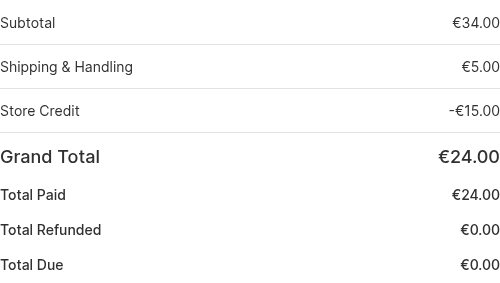
The line appears on the order, invoice, and credit memo views in the admin, on the matching pages in My Account, and on the printed PDF for each document. Store Credit also adds base_store_credit_amount and store_credit_amount as extension attributes on the order, invoice, credit memo, and cart totals, so the amount is available to any integration that reads those objects through the API.
Reading the Trail Afterwards
Every one of these steps leaves a row in the ledger with the order, invoice, or credit memo it belongs to, which is what makes the admin credit history readable after the fact: a spend, then a refund, then a revert, each linked to the document that caused it. The customer sees the same sequence in their account history, minus the internal notes.
Related Topics
- Spending Store Credit - what happens before the order is placed.
- Refunding to Store Credit - the credit memo workflow and its permissions.
- Store Credit Event Reference - the exact Magento events behind each step, and the events Store Credit fires in return.