Content Security Policy Optimized Allowlist
This module tightens Magento's Content Security Policy (CSP) by only loading the csp_whitelist.xml files you actually need. That usually means a smaller CSP header, fewer allowed third-party domains, and a smaller XSS blast radius.
Magento builds the Content-Security-Policy header from allowlists that ship with Magento and third-party extensions. Those domains are merged automatically, even if they aren't needed for the page you're rendering. Convenient? Yes. Ideal for security? Not always.
Even with CSP fully enforced (no eval, no unsigned inline scripts), allowing "too many" third-party script domains can still be abused in creative ways (see the research section below).
How the Optimized Allowlist Works
The extension checks whether a .phtml file from an extension is actually rendered on the current page. If it is, that extension's csp_whitelist.xml is included in the CSP header. If not, its allowlist is skipped entirely.
This supports two modes:
- Fully disable all module
csp_whitelist.xmlfiles The safest option. You can still include acsp_whitelist.xmlfile directly in your theme. - Only load an extension's allowlist when its templates are used
If a
.phtmlfile from an installed extension is actually rendered, that extension's allowlist is included in the CSP header.
By default, option 2 is enabled after installation.
Installing the Optimized CSP Allowlist Module
Install the Hyvä Content Security Policy Optimized Allowlist module via Composer:
Template-based allowlist optimization is enabled by default after installation.
Configuring the Optimized CSP Allowlist
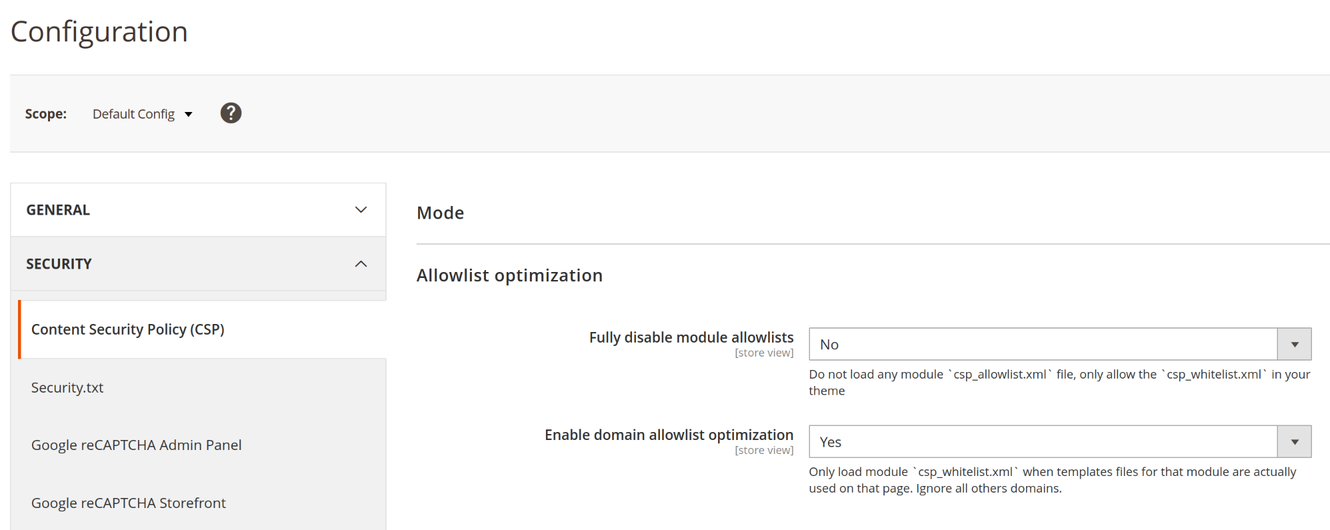
Configure the CSP Optimized Allowlist extension per store:
- Go to Stores -> Configuration
- Then Security -> Content Security Policy (CSP)
- Fully disable module allowlists (default: No)
- Enable allowlist optimization (default: Yes)
Research: XSS risks when allowing script domains
On a vanilla Magento installation (tested on 2.4.8-p1), 25 of the 46 allowed domain entries could be used as part of an XSS technique.
For example, *.google.com is allowlisted in magento/module-payment-services-paypal/etc/csp_whitelist.xml, which can enable an injection like:
The endpoint reflects the callback parameter, which triggers alert(1337). In a real attack, that could be much worse than an alert.
Adding CSP Domains and Hashes via ViewModel (Without XML)
You can use the ViewModel \Hyva\OptimizedCspAllowlist\ViewModel\Hosts to add domains without csp_whitelist.xml. Call the add(string $policyId, string|array $values) method to register allowed hosts or hashes directly from a .phtml template.
This is handy when you want to be very specific about which domains (or hashes) are allowed on the storefront. It also helps with dynamic setups (for example multilingual domains or store-specific CDNs).
For instance, a Google Analytics template can register its required domain right where it's used, instead of relying on a broad XML allowlist.
Allowing Dynamic Domains per Store or Locale
Instead of allowlisting something broad like *.host.ext, you can allow only the exact domain you need (for example lang.host.ext). This keeps your CSP header as tight as possible.
Injecting the ViewModel in Any Theme via Layout XML
ViewModels can be injected in layout.xml for any Magento theme (not just Hyvä Themes).
Add the ViewModel as a block argument in your layout XML:
<!-- ... snap ... -->
<block ...>
  <arguments>
    <argument name="csp_view_model" xsi:type="object">\Hyva\OptimizedCspAllowlist\ViewModel\Hosts</argument>
  </arguments>
</block>
<!-- ... /snap ... -->
Then call the ViewModel in your .phtml file to register the allowed domain:
<?php
// .. snap
$cspViewModel = $block->getCspViewModel();
$cspViewModel->add('script-src', 'https://lang.host.ext');
// .. /snap
Using the ViewModel Registry in Hyvä Themes
When using Hyvä Themes, you can load the CSP ViewModel through the $viewModels->require(...) registry instead of layout XML arguments.
<?php
// .. snap
$cspViewModel = $viewModels->require(\Hyva\OptimizedCspAllowlist\ViewModel\Hosts::class);
$cspViewModel->add('script-src', 'https://lang.host.ext');
// .. /snap
Related Topics
- CSP overview - Entry point for Hyvä's CSP documentation
- CSP and Block Caching - How CSP interacts with Magento caching (and why it matters for nonces/hashes)
- Nonce and SHA Hashes - When to use nonces vs hashes for strict CSP
- Magento CSP Configuration - Where CSP is configured in Magento and which settings matter
- CSP compatibility - Tips for dealing with third-party extensions under strict CSP
- CSP in context: payment buttons - A common source of third-party script domains (and allowlist bloat)