Partner Program
Track your agency's Hyvä partner tier, points, and progress toward the next tier, and submit the contributions that earn those points.
Note
The pages described here are only visible to team managers.
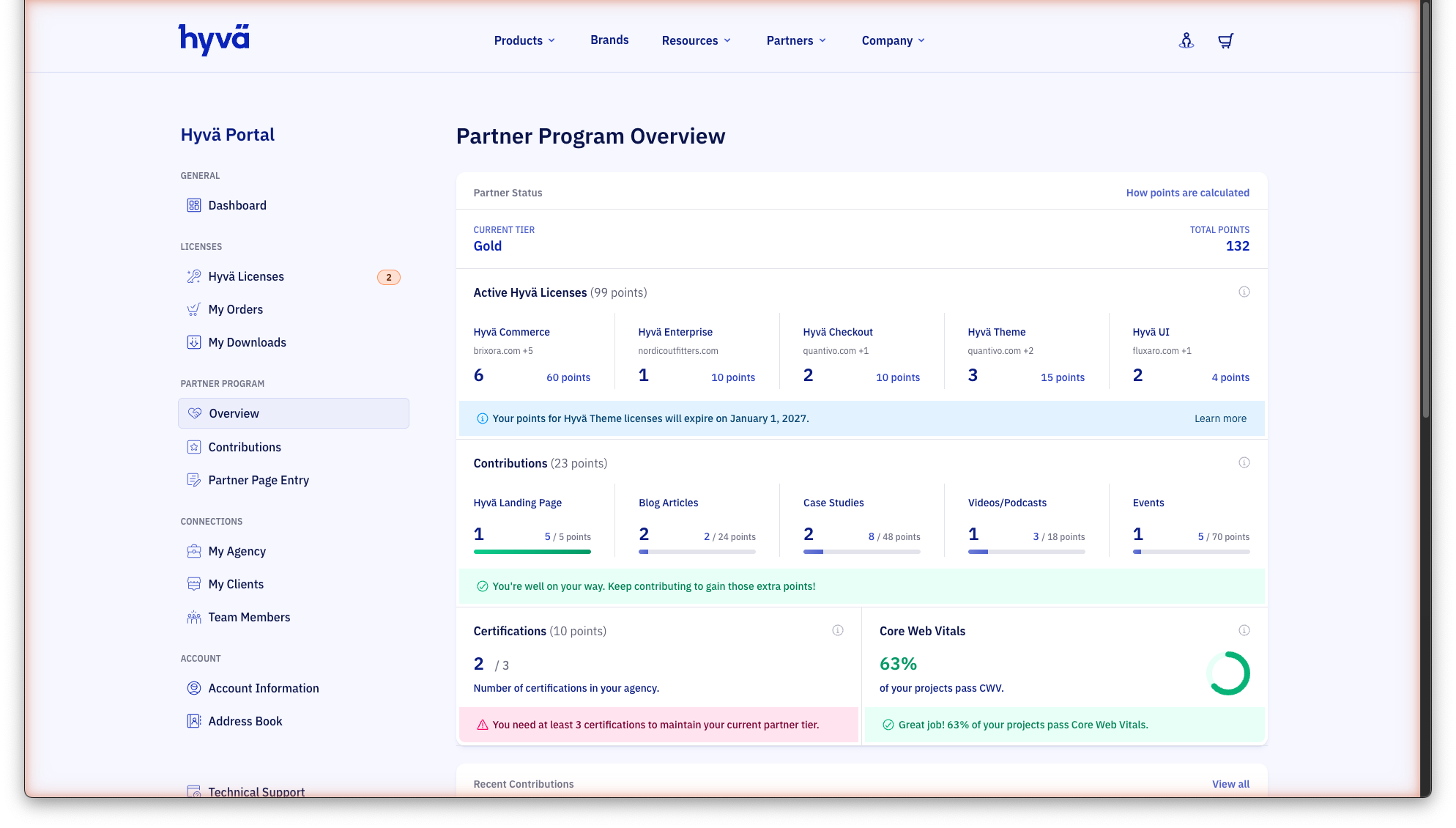
Partner Status
The top section shows your current tier (Bronze, Silver, Gold, or Platinum) and your total points across all categories. A "How points are calculated" link opens the full scoring breakdown.
How Points Are Calculated
Points are tallied once per year in December, based on the current and previous year's activity. During the year:
- You cannot be downgraded: your tier is locked until the next annual calculation
- You can be upgraded mid-year if your points increase enough
- At least 45% of your total points must come from license sales. If your combined marketing and certification points exceed 55% of your total, they are capped at that threshold (exception: the first 3 certifications always count)
- Only licenses registered in the Hyvä Portal count toward your score
Note
No downgrades will occur in 2026, due to a transition period towards the new point system.
Active Hyvä Licenses
This section shows the number of active licenses your agency holds per product and the points each group earns:
| Product | Points per license |
|---|---|
| Hyvä Commerce | 10 |
| Hyvä Enterprise | 10 |
| Hyvä Checkout | 5 |
| Hyvä UI | 1 |
Client licenses connected through My Clients count toward your agency's total.
Certifications
Shows the number of certified developers in your agency. Each certification owned by a developer earns 3 points, valid for the certification year and the two following years.
A warning appears if your agency doesn't meet the certification threshold for your current tier. See Tier Requirements for the minimum per tier.
Note
The first 3 certifications will always count towards your total partner points, regardless of the license sales.
Core Web Vitals
Displays the percentage of your agency's Hyvä projects that pass Core Web Vitals. Meeting the threshold for your tier is a partnership requirement, listed under Tier Requirements.
Contributions
The Contributions page is where you submit and manage your agency's Hyvä content contributions. Approved contributions earn points toward your partner tier, and the Partner Program Overview shows how many you have per type, the points earned, and how far you are from the maximum in each category.
Contribution points are valid for the calendar year they were earned and the following year. Landing page points are valid indefinitely.
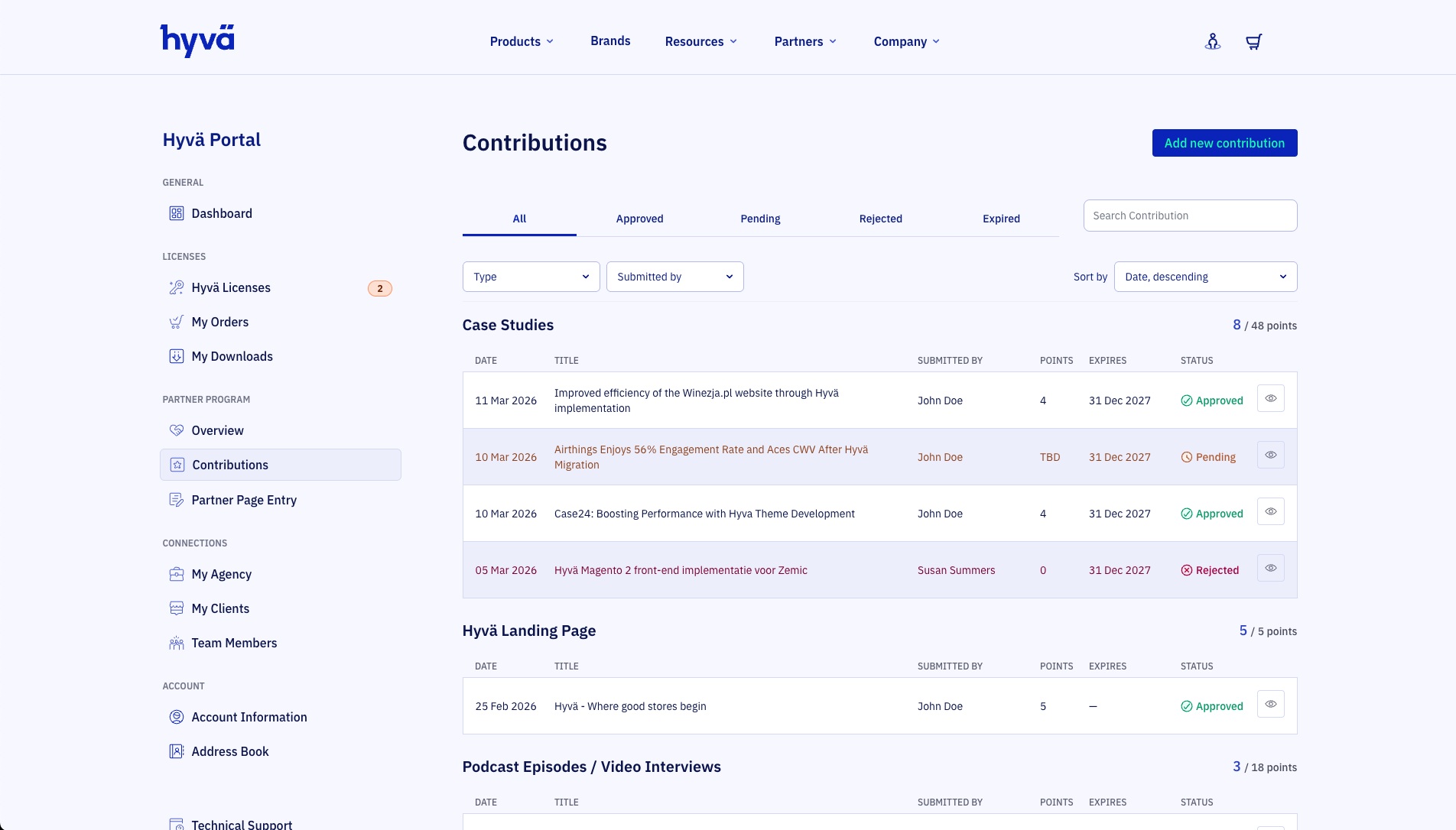
Contribution Types
Each contribution type earns a fixed number of points when approved by the Hyvä team.
| Type | Points | Max points | Validity |
|---|---|---|---|
| Landing Page | 5 | 5 | Indefinite |
| Blog Article | 2 | 24 | Year of contribution until end of the next year |
| Case Study | 4 | 48 | Year of contribution until end of the next year |
| Video/Podcast | 3 | 18 | Year of contribution until end of the next year |
| Presentation | 5 | 20 | Year of contribution until end of the next year |
| Event | 5 | 20 | Year of contribution until end of the next year |
| Open Contribution | Varies | Varies | Varies |
Note
Presence at a Hyvä booth at an Ecommerce Expo (15 points, max 30) is awarded directly by the Hyvä team and does not require a submission.
Note
Marketing contribution points plus certification points are capped at 55% of your total points.
Submitting a Contribution
Click Add new contribution to open the "Share your contribution" dialog.
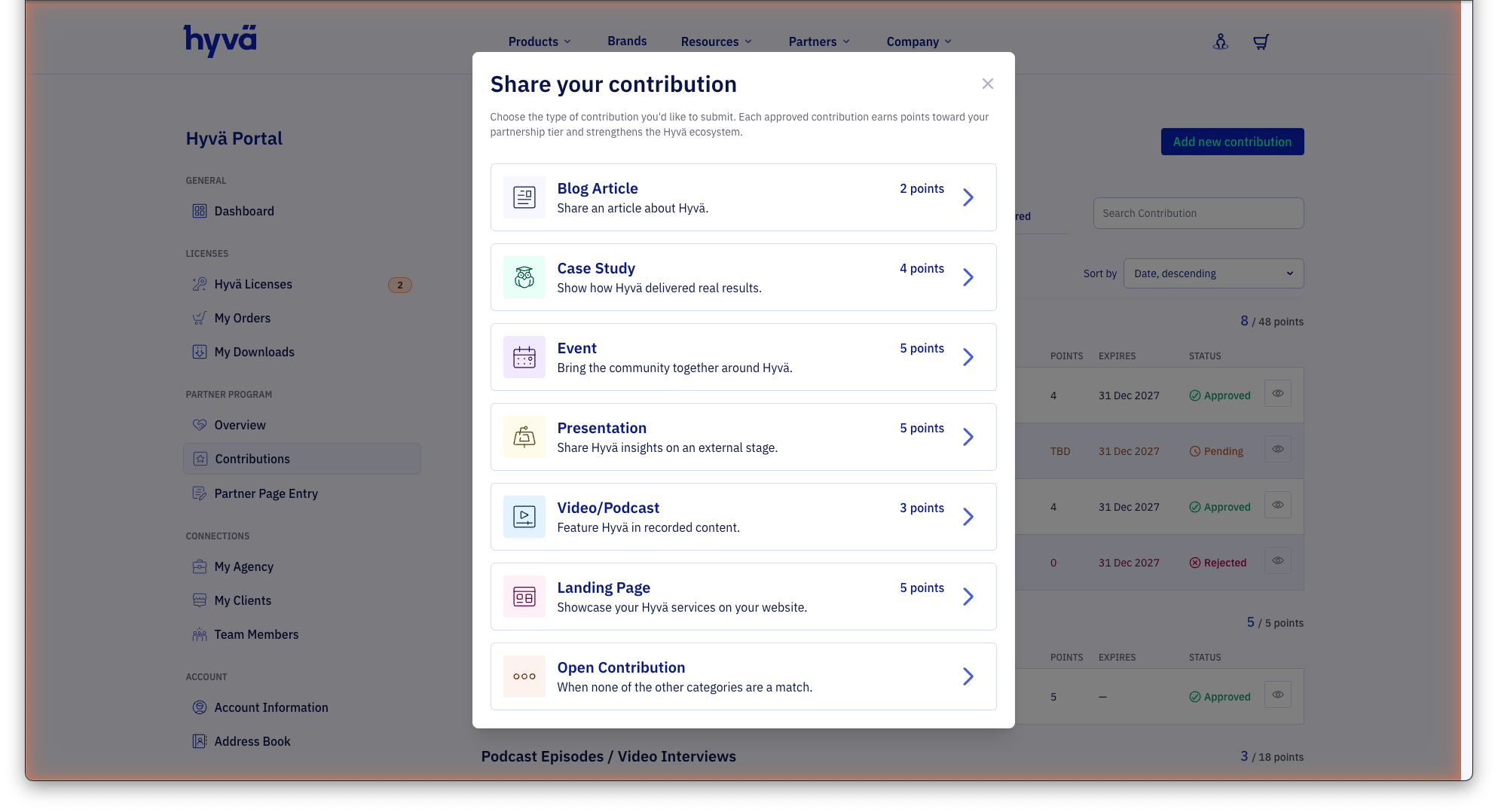
Select the contribution type. Each approved contribution earns points toward your partnership tier. The Hyvä team reviews every submission for quality and relevance. You will only be contacted if changes are requested or the contribution is rejected.
Most contribution types: URL submission
For Blog Article, Video/Podcast, Presentation, Event, Landing Page, and Open Contribution, selecting a type opens a simple one-step form:
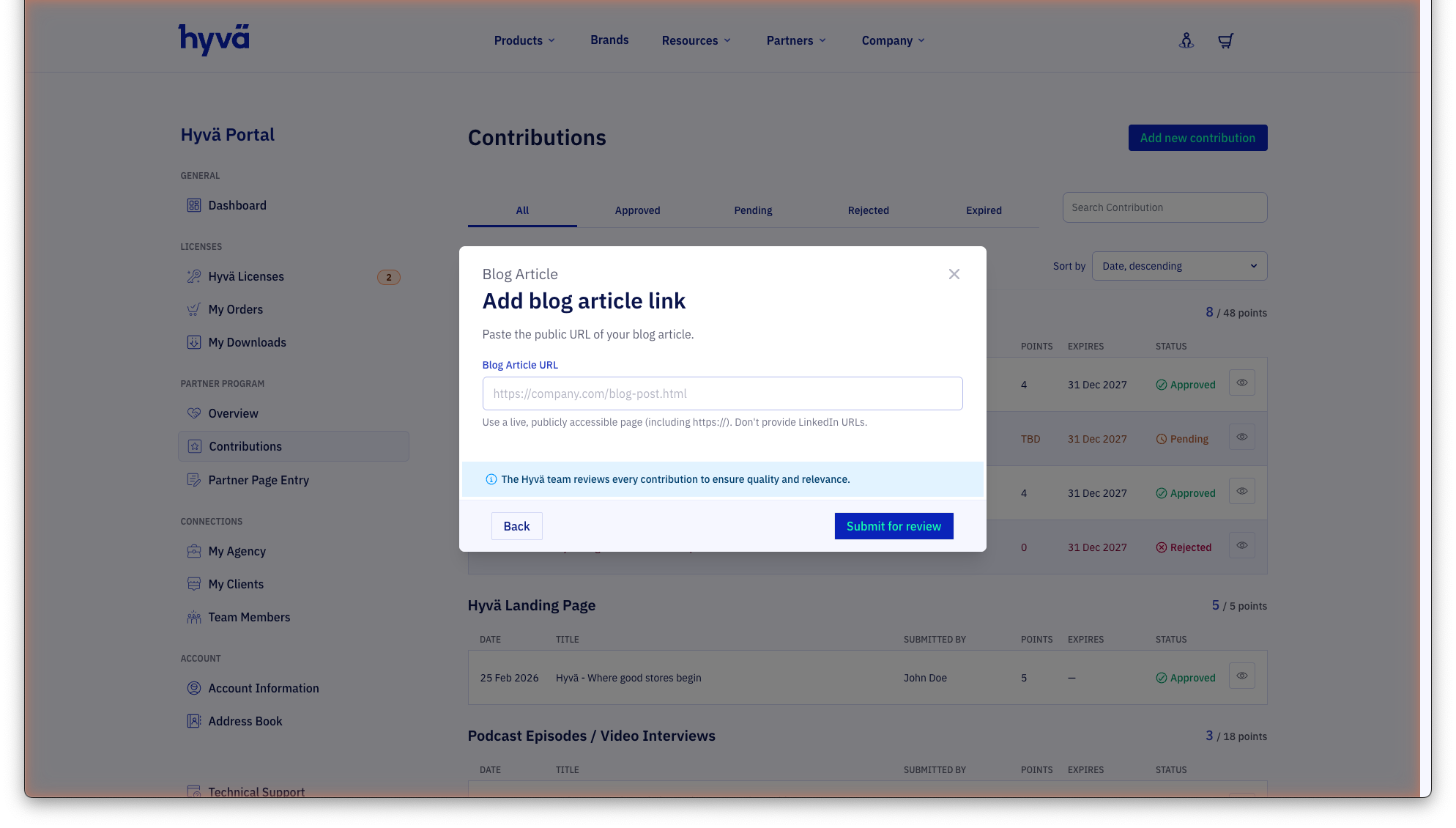
Paste the public URL of your content. The URL must be live and publicly accessible. For Blog Articles, Landing Pages, and Videos/Podcasts, LinkedIn URLs are not accepted. Click Submit for review to send your submission.
Case Study: 5-step form
Case Studies use a guided multi-step form that collects additional information so Hyvä can also feature the case study on hyva.io.
Step 1: Case study link
Paste the public URL of your case study page showing how Hyvä delivered real results. LinkedIn URLs are not accepted.
Step 2: Merchant details
Provide details about the merchant the project was built for:
- Merchant name: The brand name as shown on their website
- Merchant website URL: Link to the merchant's main site (not the case study page)
- Merchant logo (SVG): Upload the merchant's logo in SVG format
- Countries / markets of operation: The most common countries are listed directly; use the search field to find any other country. You can also choose "International"
- Industry vertical: Choose the closest match to the merchant's industry
- Target audience: Pick the primary audience for this store (e.g. B2B, B2C)
Step 3: Project details
- Hyvä products used: Check all Hyvä products that were part of the solution (Commerce, Enterprise, Checkout, Theme, UI)
- Project type: Choose the starting point (e.g. New Build, Migration)
Step 4: Case study details
The title and description are prefilled from the URL you provided. Edit them if needed and select the language of the case study page.
Step 5: Review and Submit
Review all entered details. You can jump back to edit any section. A Publish on hyva.io toggle lets you allow Hyvä to feature the case study on the Hyvä website. Click Submit for review to send your submission.
Browsing Contributions
The contributions list is grouped by type and shows the following columns for each entry:
- Date: When the contribution was submitted
- Title: The title of the content, pulled from the submitted URL
- Submitted by: The team member who submitted the contribution
- Points: Points awarded (shown as TBD while under review)
- Expires: The date when the contribution points expire
- Status: Current review status
Use the tabs at the top to filter by status:
- All: Every submission regardless of status
- Approved: Contributions that have been accepted and are earning points
- Pending: Submissions currently under review
- Rejected: Submissions that did not meet the criteria
- Expired: Contributions whose points period has ended
You can also filter by Type or Submitted by, search by title, and sort by date, title or points.
Next Steps
Three action cards at the bottom of the Partner Program Overview suggest ways to grow your partnership:
- Flaunt: Download official Hyvä partner badges to use on your website and marketing materials
- Curate: Keep your agency profile accurate by editing your Partner Page Entry
- Represent: Submit a new contribution to earn more points toward a higher tier
Related Topics
- Hyvä Agency Partner Program: the tier each points total unlocks, and the benefits that come with it.
- Agency and Team: the team members and clients whose licenses count toward your points.
- Hyvä Certification Program: how your developers earn the certifications that score points.