Role Assignment Audit Log
Who gave whom which role, and when? Magento does not record it, which makes that question impossible to answer after the fact. Advanced Admin Permissions adds a Role Assignment Audit log that records every change to an admin user's or an integration's roles, including the attempts that were refused.
Opening the Audit Log
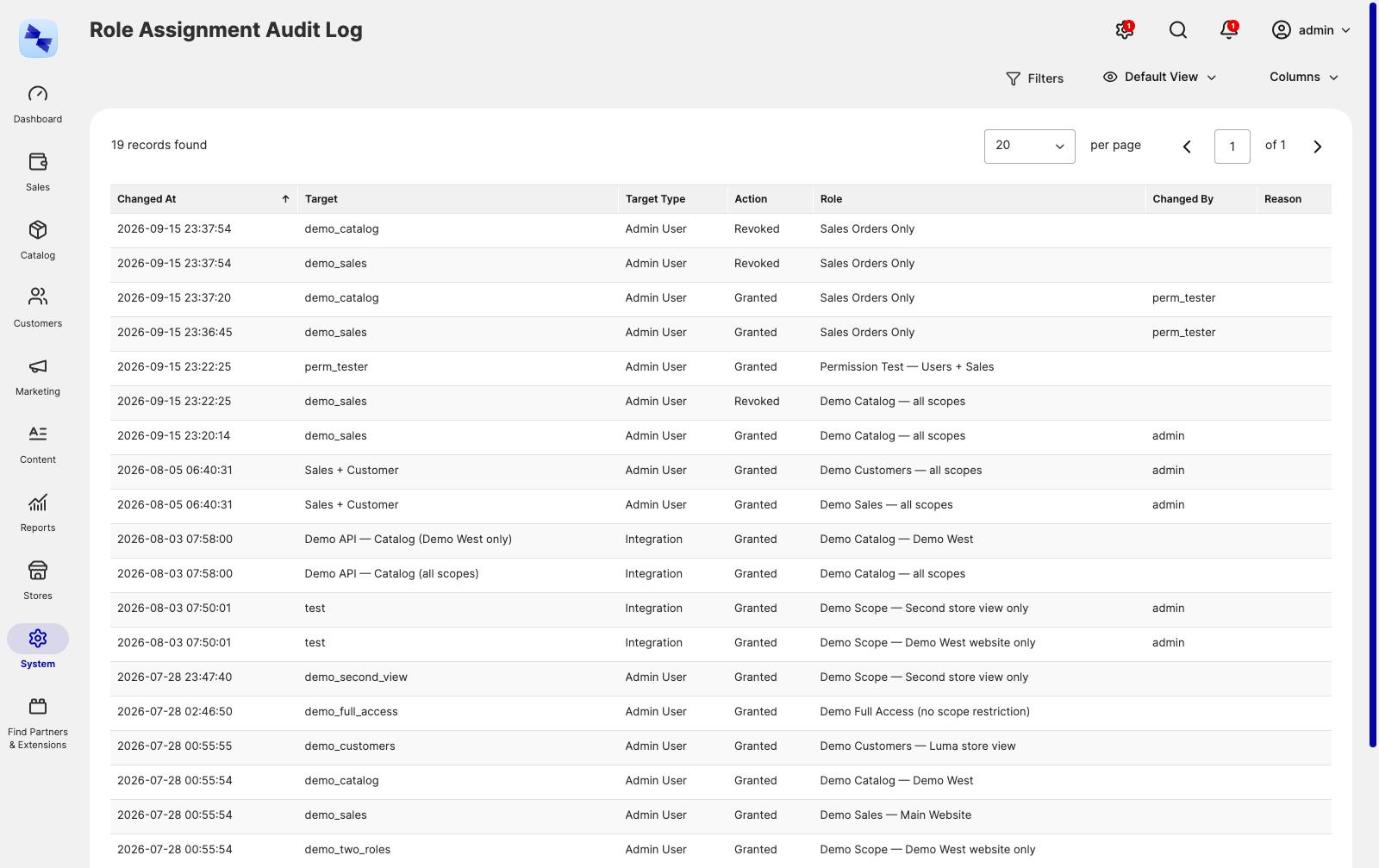
The audit log is a read-only grid at System → Permissions → Role Assignment Audit, listing entries newest first.
Access is governed by its own ACL resource, Hyva_AdvancedAdminPermissions::audit, which appears in the role resource tree under System → Permissions as Role Assignment Audit Log. Grant it to the roles that should be able to read the log.
What the Audit Log Records
Each audit log entry records one role granted or revoked on one target, or one change to a role's negative flag:
| Column | What it holds |
|---|---|
| Changed At | When the change was recorded |
| Target | The admin user or integration whose roles changed. Empty for a change to a role's negative flag. |
| Target Type | Whether the roles changed on an admin user or on an integration. Negative-flag entries show Admin User. |
| Action | Granted, Revoked, Grant failed, Revocation failed, Role made negative, Role no longer negative or Making a role negative failed |
| Role | The group role that was granted, revoked or flagged |
| Changed By | The admin user who made the change, or empty for a change made by the CLI, cron or a data patch |
| Reason | Why a refused attempt did not go through, or why a grant was revoked without an acting admin ("Grant expired", "Role deleted"). For negative-flag entries, where the change was made: an admin action or the command line. |
The grid filters by target, role, acting admin, action and date range. Action filters through a dropdown of its values rather than a free text field, so nobody has to know how the log stores them.
Usernames and role names are denormalized into each entry, so the log stays readable after a user, integration or role is later deleted. Entries written within the same second keep the order they happened in.
Audit log entries are kept indefinitely. Nothing prunes the log.
Refused Attempts Are Recorded Too
An attempt that did not take effect is recorded as Grant failed, Revocation failed or Making a role negative failed, with the roles it would have changed and the reason it did not go through, in the Reason column. Refused attempts are recorded on every path, including the User Role tab, the bulk mass actions and the role form's Negative (deny) role checkbox.
This is deliberate. Who tried to give whom what is exactly the question an audit log is kept for, and a log of only the successful changes cannot answer it. If an admin repeatedly tries to grant themselves a role they are not allowed to hand out, the audit log is where you will see it.
The refusals come from the rules described in Permission Guardrails.
Where Audit Log Entries Come From
The audit log captures role grants and revocations from:
- The User Role tab on the admin user edit page.
- The Role Users tab on the role edit page. Removing a user there is recorded as Revoked, with the acting admin in Changed By.
- The Assign a role and Remove a role mass actions on the users grid.
- The API tab on the integration edit page, where roles are granted to an integration.
- The hourly cleanup of lapsed grants and the
hyva:admin-permissions:revoke-expired-grantscommand. Each removed grant, for admin users and integrations alike, is recorded as Revoked with no Changed By and the reason "Grant expired". - Deleting a role. Its holders' grants, for admin users and integrations alike, are recorded as Revoked with the reason "Role deleted".
- Deleting an integration.
- Flagging or unflagging a role as negative, on the role form or with
hyva:admin-permissions:set-negative-role.
The log starts empty
The audit log records changes from the moment Advanced Admin Permissions is installed. It cannot reconstruct who assigned the roles your admin users already hold, because Magento never recorded it. For the current state rather than the history, use the Effective Permissions viewer.
Related Topics
- Permission Guardrails - the rules behind the Grant failed, Revocation failed and Making a role negative failed entries.
- Multiple Roles per Admin User - the role changes that generate audit entries.
- Roles for Integrations - integration grants, which appear in the same log.
- Effective Permissions Viewer - the current state, rather than the history of changes.