Roles for Integrations
Magento gives every integration its own resource tree, ticked box by box on the integration itself. Keep six integrations in step and you are maintaining the same curated resource set six times. Advanced Admin Permissions lets you grant group roles to an integration instead, so the resource set is defined once and every integration holding it follows along.
Granting Roles to an Integration
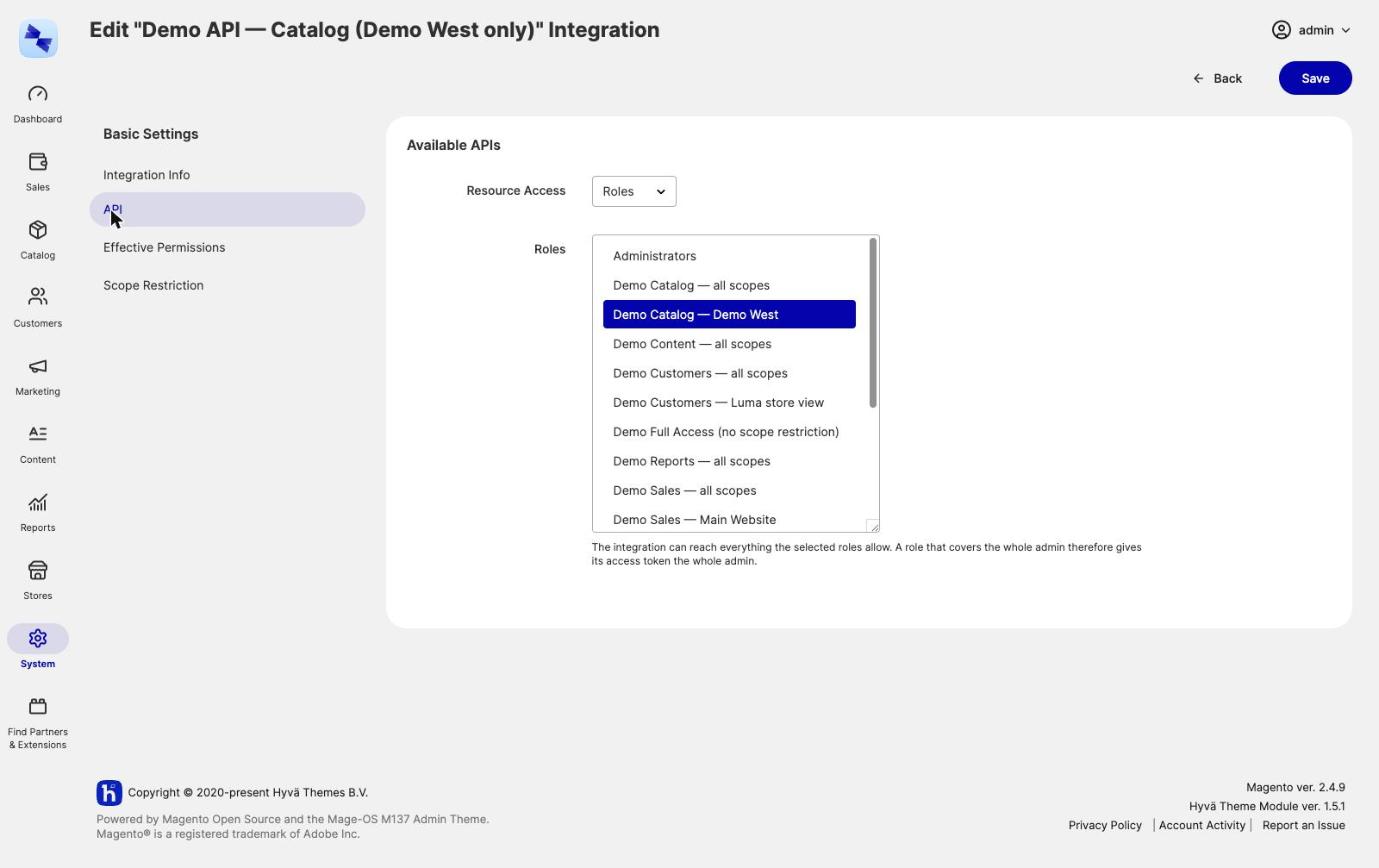
Integration roles are set on the API tab at System → Extensions → Integrations → [integration] → API. With Advanced Admin Permissions installed, Resource Access offers a third option:
| Resource Access | What it does |
|---|---|
| Custom | Tick resources one by one, exactly as without Advanced Admin Permissions. Saving as Custom revokes any granted roles. |
| Roles | Pick any number of group roles. The integration can reach everything they allow. Saving as Roles drops the ticked resources. |
| All | Every resource in the system. Magento's own behavior. Saving as All revokes any granted roles. |
The three Resource Access modes are exclusive on the API tab: an integration saved there holds either roles or its own resources, never both.
To grant roles to an integration:
- Open
System → Extensions → Integrationsand click the integration. - Switch to the API tab.
- Set Resource Access to Roles.
- Tick the group roles the integration should hold, and save.
How an Integration's Permissions Are Evaluated
At every REST, SOAP and GraphQL permission check, the roles granted to an integration are unioned with the integration's own resources. Because the API tab makes the Roles and Custom modes exclusive, both only coexist when code grants roles without setting the mode, for example in a data patch.
Two rules override that union:
- A negative (deny) role wins over both. A deny role granted to an integration denies its resources whatever the role grants and whatever is ticked on the API tab.
- A grant whose expiry has passed stops granting immediately, the same way it does for an admin user.
Restricting an Integration to Websites or Store Views
A scope-restricted role restricts the integration too. Its REST and SOAP calls are narrowed to that role's websites or store views by the same enforcement that covers a restricted admin user, described in Website and Store View Restriction. A restricted integration has these further limits:
- GraphQL is not scope-restricted. The integration's combined role permissions still apply to GraphQL, but its scope restriction does not.
- Asynchronous and bulk REST requests are refused (
/rest/async/…,/rest/async/bulk/…), because their work runs later in a queue consumer where no restriction can be applied. - Global-only resources are denied: taxes, attributes and attribute sets, customer groups, store structure, order statuses, currency rates, index management and import/export. See Areas That Are Denied Rather Than Narrowed.
An integration can also carry a restriction of its own, on a Scope Restriction tab at System → Extensions → Integrations → [integration] → Scope Restriction. The tab appears once the integration has been saved. What is stored there overrides the granted roles, the way a user's own restriction overrides theirs. That includes Not restricted, which lifts a role's restriction for this one integration.
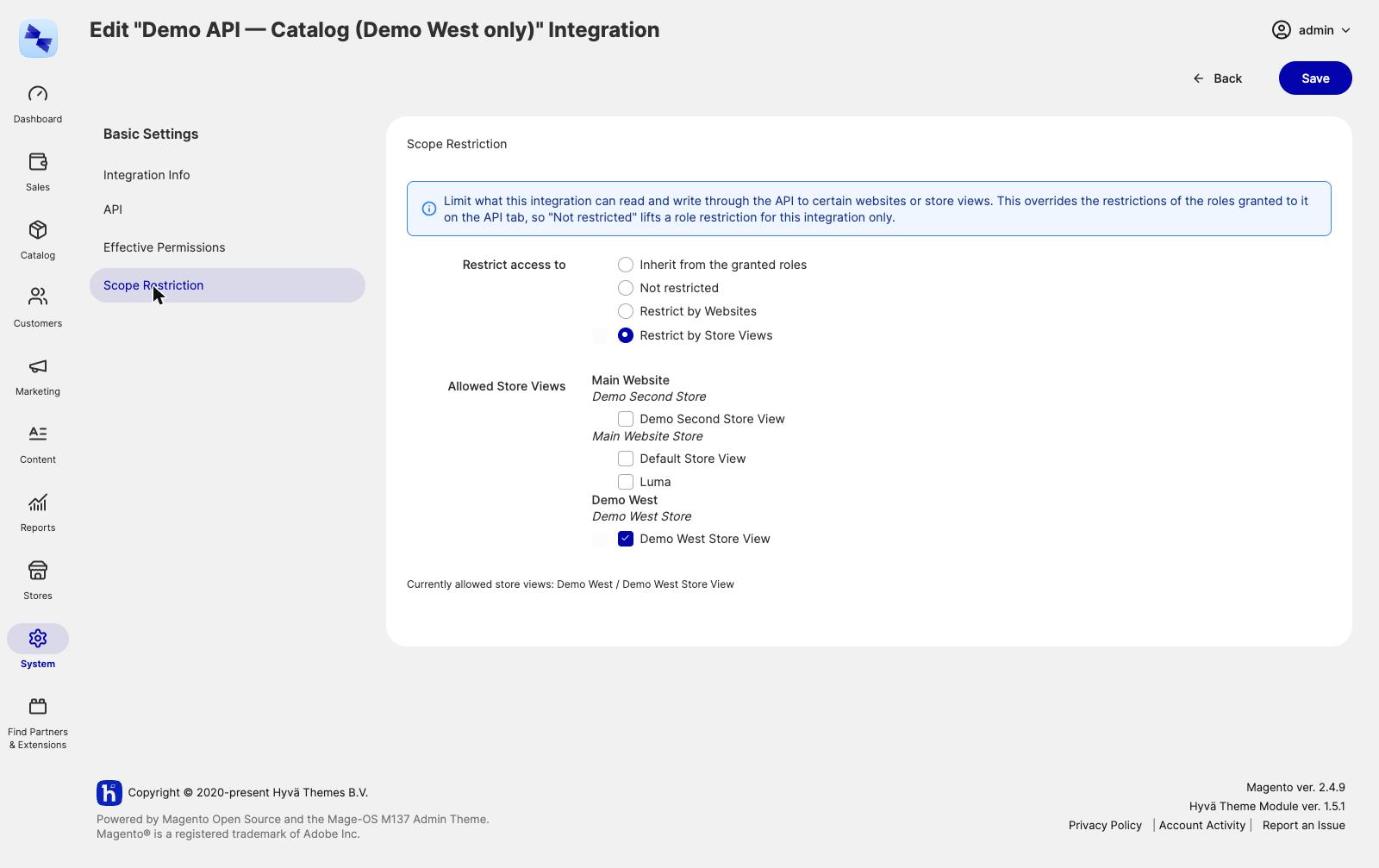
An integration with neither a restriction of its own nor a restricted role is unrestricted, because the resources ticked on its API tab carry no scope of their own.
The restriction is dropped with the integration, so a later integration that reuses the same id does not inherit it.
Restrict the integration, not just the role
An integration is often the thing you most want scoped: a marketplace connector that should only ever touch one website, say. Set the restriction on the integration itself and it holds regardless of which roles you later grant it.
Seeing What an Integration Can Reach
An Effective Permissions tab on the integration edit page lists every ACL resource with an allowed or denied marker and what grants it. When the integration has resources of its own, they are listed as an "Own API resources" source next to the granted roles, so you can see which part of the access the integration has by itself and which part a role gave it.
The same view is available on the command line:
See the Effective Permissions Viewer for how to read it.
Auditing Integration Grants
Grants and revocations on an integration appear in System → Permissions → Role Assignment Audit alongside the admin user entries, with a Target Type column telling the two apart. See the Role Assignment Audit Log.
Notes for Automating the Integrations Page
Two details matter if you script this page rather than clicking it.
all_resources is now a hidden field. Magento's all_resources field reads any truthy value as "grant every resource", so it could not carry a third option. It stays in the form as a hidden input that the new select fills, and the save path derives it from the mode again server-side. A request that claims the roles mode alongside all_resources=1 therefore grants nothing extra.
An integration saved without knowing about the mode is unaffected. An integration saved as Custom or All - by a config file, a data patch, or any other code that knows nothing about the new option - behaves exactly as it did before.
Bulk assignment is not offered for integrations, because the integrations grid has no mass actions to hang it on.
Grants are stored in a hyva_permissions_integration_role table rather than in authorization_role. Magento gives every integration exactly one role of its own and resolves it with the first row belonging to that integration, so extra rows there would be picked up arbitrarily.
Related Topics
- Multiple Roles per Admin User - the roles you grant to integrations are ordinary group roles.
- Website and Store View Restriction - the enforcement that a restricted integration's API calls go through.
- Effective Permissions Viewer - reading the integration's Effective Permissions tab.