Time-Boxed Role Grants
Some admin access is meant to be temporary: an agency helping with a migration, a contractor covering a launch, a colleague standing in during someone's leave. Advanced Admin Permissions lets you grant a role until a chosen date and time, so the access ends on its own instead of relying on somebody remembering to take it away.
Granting a Role Until a Date
Expiries are set alongside the role itself, on the User Role tab of the admin user edit page at System → Permissions → All Users → [user] → User Role. Advanced Admin Permissions adds an Expires (admin timezone) column next to each role.
- Open
System → Permissions → All Usersand click the admin user. - Switch to the User Role tab.
- Tick the role you want to grant.
- In the Expires (admin timezone) column on that row, pick the date and time the grant should end. Leave it blank for a permanent grant.
- Save the user.
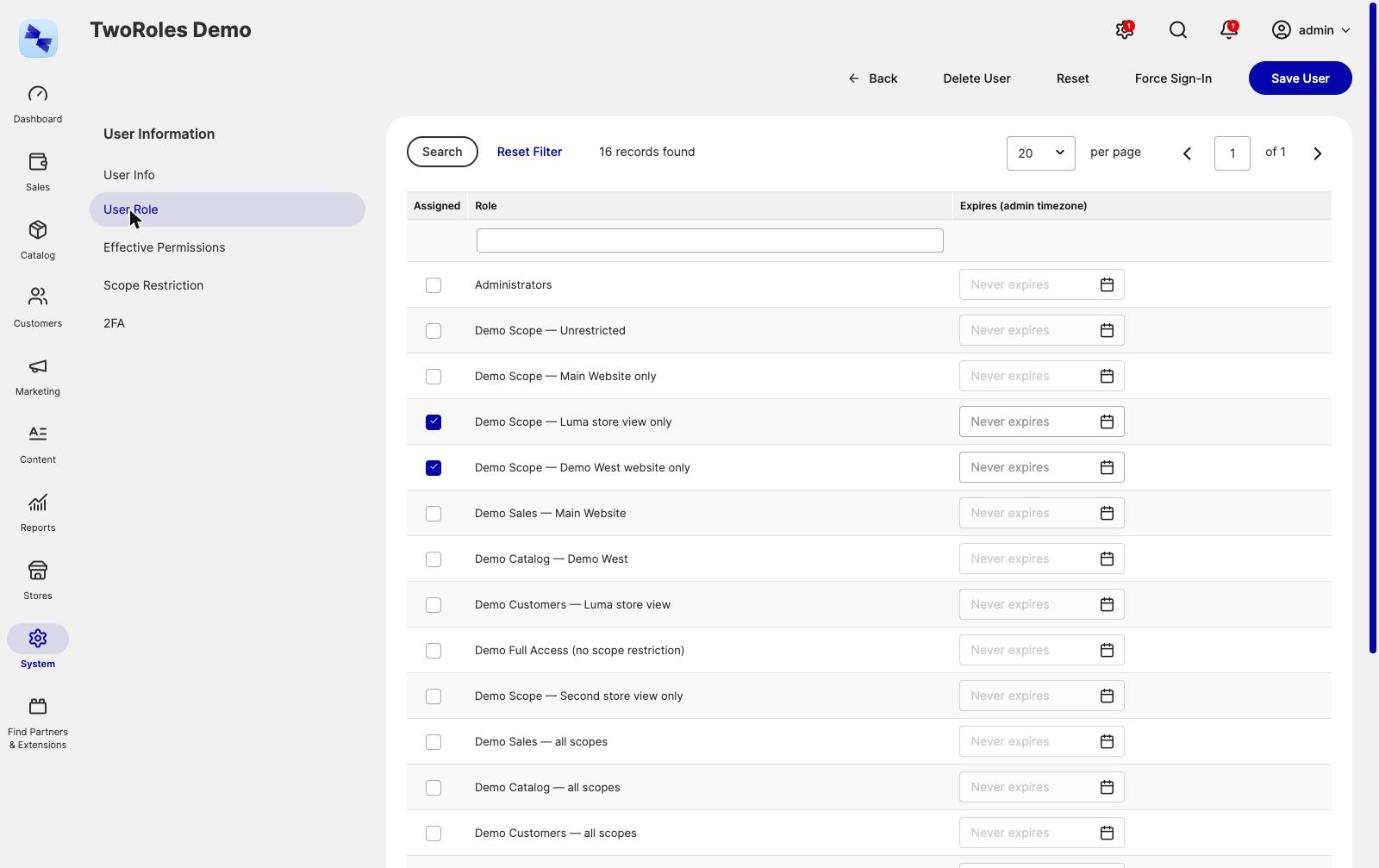
The Expires (admin timezone) field uses Magento's admin calendar, so the date and time are picked rather than typed, and past days cannot be chosen. The field stays empty and disabled until the role is ticked, and what you entered survives filtering, sorting and paging the grid.
Expiry times are in the admin timezone
The date and time you pick are read in the store's configured timezone (default scope) and stored in UTC. The Expires (admin timezone) field and the set-role-expiry command show them back in that timezone.
When an Expired Grant Stops Working
A lapsed grant stops granting access immediately, at permission-check time. The moment the expiry passes, the role no longer counts towards what the user can reach, whether they are mid-session or logging in fresh.
An hourly cron job then clears away what is left of it: the role assignment and the expiry record. That job is cleanup only, so a stopped cron delays the tidying, not the expiry. Access has already ended. Each grant the cleanup removes shows up in the audit log as Revoked, with no Changed By and the reason "Grant expired".
Run the cleanup on demand with:
An expiry is also removed with the assignment it belongs to, whichever screen removes it. Granting the same role again later therefore cannot revive an old date, and the database enforces this too: the expiry table has cascading foreign keys, so an expiry cannot outlive the user or the role it belongs to.
Setting and Clearing an Expiry from the Command Line
The hyva:admin-permissions:set-role-expiry command sets or clears the expiry on an existing grant of an admin user, which is handy for scripting a handover or an offboarding. The role must already be assigned to the user:
# End the existing grant of role 5 to user "contractor" at the end of March 2027
bin/magento hyva:admin-permissions:set-role-expiry contractor 5 "2027-03-31 23:59:00"

# Make the same grant permanent again
bin/magento hyva:admin-permissions:set-role-expiry contractor 5 --clear
The first argument takes an admin username or user id, and the second takes the group role id. The date and time must be exactly in the format YYYY-MM-DD HH:MM:SS, in the admin timezone and in the future. See the Command Line Reference for the full signature.
What Happens if the Date Is Rejected
A date the form cannot accept takes the whole save down with it, rather than being reported while the role it belongs to quietly stays behind as a permanent grant. If a save is rejected over an expiry, fix the date and save again - no half-applied grant is left behind.
You cannot move the expiry on your own grant
An admin cannot change the expiry on one of their own grants, because that would be a way to extend their own access. The same rule stops an admin whose own access is time-boxed handing out access that outlives theirs. Both are covered in Permission Guardrails.
Negative Roles Cannot Be Time-Boxed
A negative (deny) role's grant cannot have an end date: a denial holds until the role is taken away. Every assigned negative role denies, and a negative role is never lapsed. Setting an end date on a negative role's grant is refused, and making a role negative deletes the existing end dates of its grants. See Negative Roles Don't Expire.
Related Topics
- Multiple Roles per Admin User - assigning the roles that these expiries apply to.
- Permission Guardrails - the rules on who may set and change an expiry.
- Role Assignment Audit Log - the record of grants, including the ones that lapsed, which show up as Revoked with the reason "Grant expired".
- Command Line Reference - the full signatures of the expiry commands.