Website and Store View Restriction
Magento's roles answer what an admin may do, never where they may do it. A catalog manager who looks after one of your five websites gets the catalog of all five. Advanced Admin Permissions adds the missing half: an admin role, an individual admin user or an integration can be restricted to certain websites or store views, and the whole admin panel narrows to match.
Setting a Website or Store View Restriction
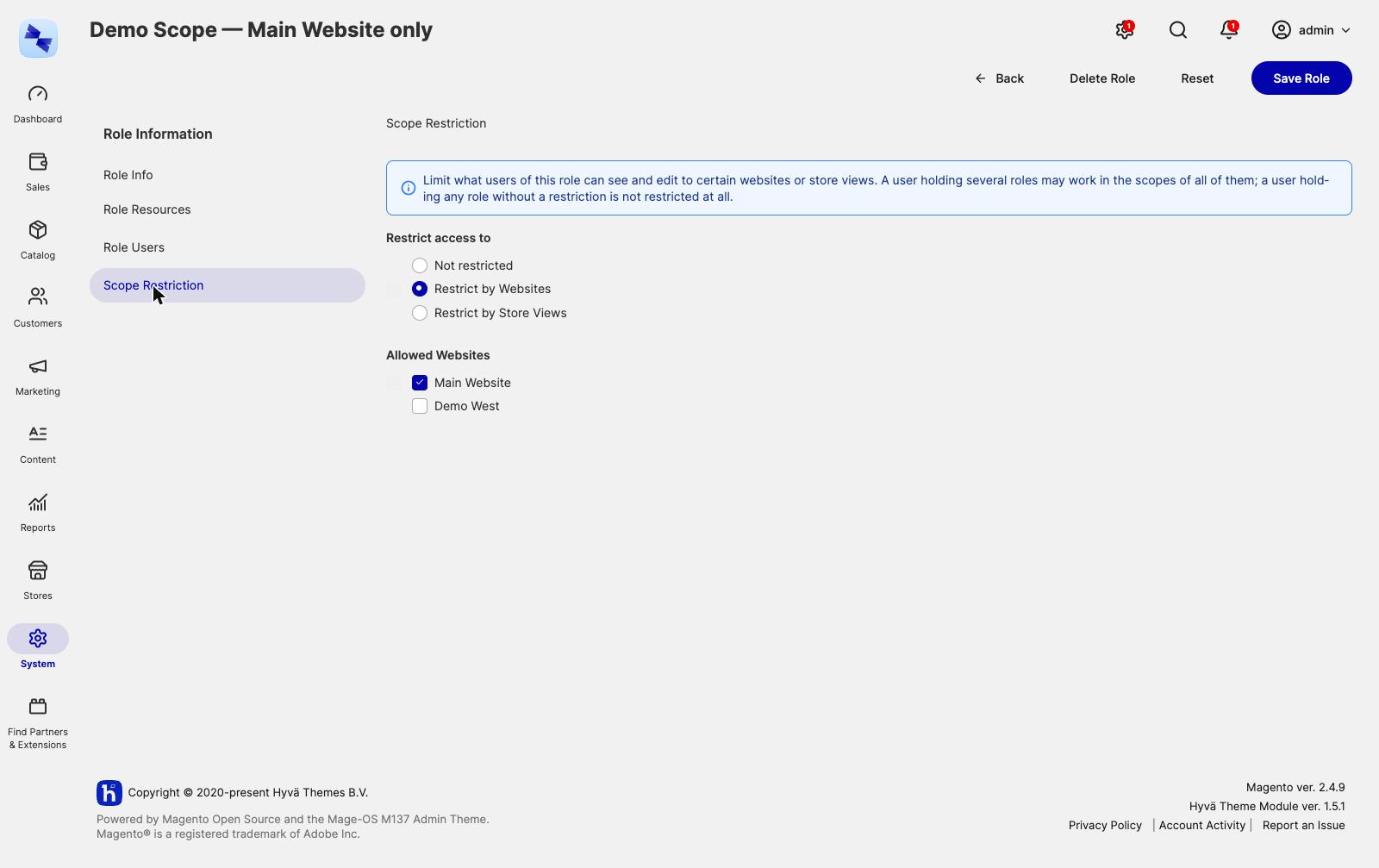
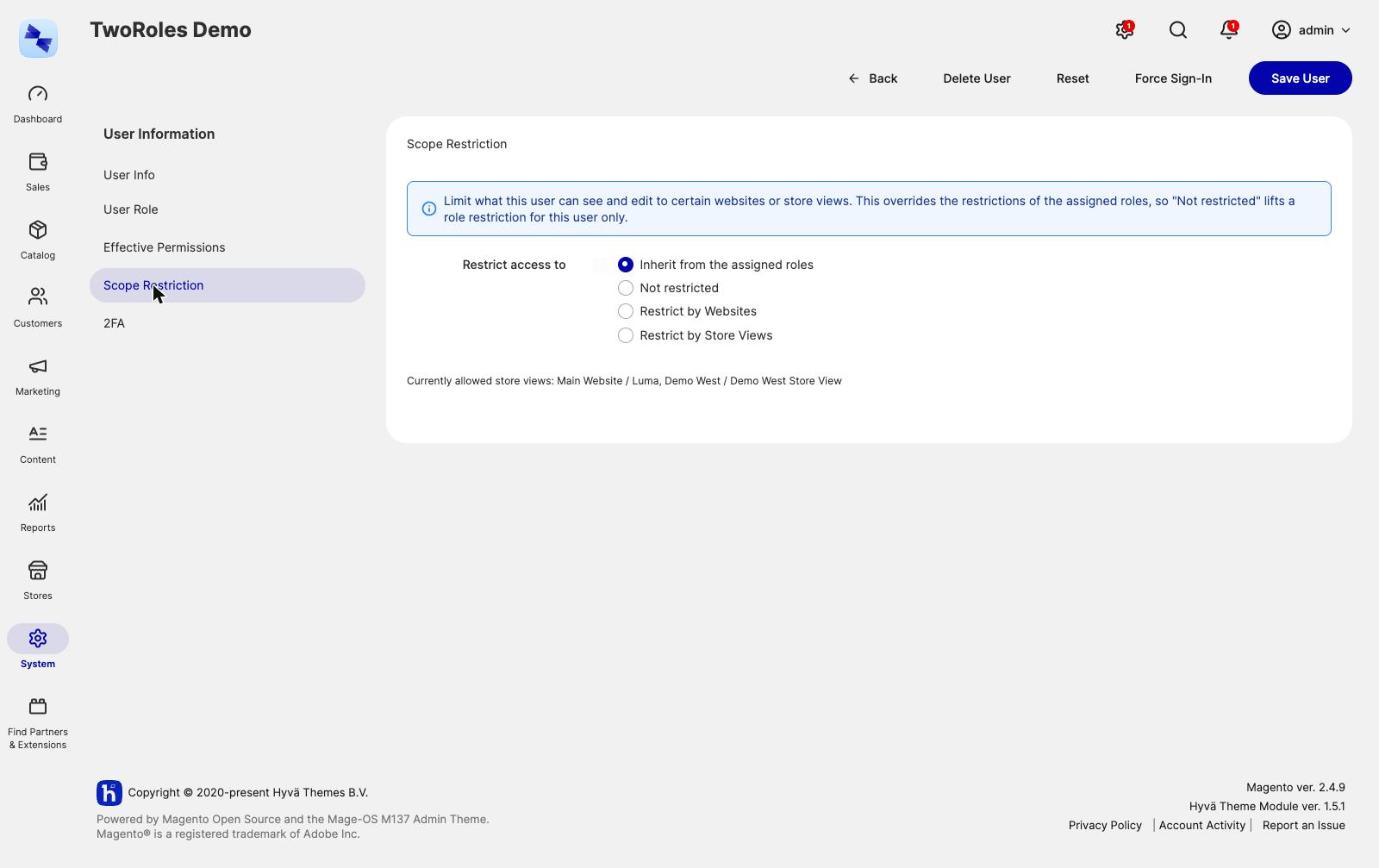
Scope restriction is set on a Scope Restriction tab, which Advanced Admin Permissions adds to three edit pages:
System → Permissions → User Roles → [role] → Scope RestrictionSystem → Permissions → All Users → [user] → Scope RestrictionSystem → Extensions → Integrations → [integration] → Scope Restriction
The Scope Restriction tab appears once the role, user or integration has been saved. To restrict a new role, save it first, then reopen it.
Each tab asks for a mode and then, for the restricting modes, a list of scopes to tick:
| Mode | What it means |
|---|---|
| Inherit from the roles | Use whatever the roles say. The admin user form labels this Inherit from the assigned roles and the integration form Inherit from the granted roles. It is the default on both, and is not offered on a role. |
| Not restricted | On a user or integration, this deliberately overrides their roles and allows every website and store view. On a role, it means the role carries no restriction: it contributes nothing and does not widen the user's other roles. |
| Restrict by Websites | Only the ticked websites, and every store view inside them. |
| Restrict by Store Views | Only the ticked store views. |
Pick the mode, tick the scopes, and save. The hyva:admin-permissions:scope command does the same thing from the command line.
How Role and User Restrictions Combine
An admin user's restriction is resolved from their roles first, and then from anything stored on the user themselves.
Across roles, scopes are unioned. A user may work in the scopes of all their roles put together. A user holding a role restricted to Website A and a role restricted to Website B works in both.
A role with nothing configured contributes nothing to that union. It does not widen the other roles. That is the rule to hold on to, because it runs the opposite way to how permissions combine, and it is deliberate:
- An ACL resource nobody configured grants nothing, so unioning permissions is safe.
- A scope nobody configured would mean every scope, so one role nobody thought to restrict would quietly undo every other role's restriction.
A user is therefore unrestricted only when none of their roles restricts them. A user with no role in force - none assigned, or every grant lapsed - and no restriction of their own is allowed no scope at all.
A restriction stored on the user overrides their roles entirely. That is what makes Not restricted on the user useful: it is how you deliberately give one person every scope even though a role they hold is restricted.
An integration's restriction resolves the same way over the roles granted to it on its API tab, with one difference: an integration without granted roles stays unrestricted, because the API resources ticked on it carry no scope. See Restricting an Integration to Websites or Store Views.
Restrict the role, not the person
Put the restriction on the role whenever you can, and leave every user on Inherit from the assigned roles. A restriction on a user is an exception, and exceptions are the things people forget about. The Scope Restriction tab on the user is there for the case that genuinely needs it.
Restricting by Store View Still Allows the Parent Website
Restricting an admin to a store view does not narrow website-scoped data below the website that store view belongs to. Products, prices and cart rules belong to a website, and there is no smaller box to put them in. An admin restricted to one store view of a website still sees that website's products, because the alternative would be seeing no products at all.
What a Restricted Admin Sees
Scope restriction is enforced generically rather than entity by entity, following the conventions Magento itself uses. That matters in practice: most custom entities are covered without anyone writing code for them.
| Where | What happens |
|---|---|
| Grids, dropdowns and mass actions | Every collection load and count is narrowed, and so is the id list a mass action works from. A scope column on the main table is filtered directly, an entity assigned through a <table>_store or <table>_website link table is filtered with a WHERE EXISTS so paging stays correct, and catalog products go through the product collection's own website filter. |
| Opening a record by id | An out-of-scope record loaded directly by id is blanked, so the admin reports it the way it reports a deleted record. This covers order, invoice, shipment, credit memo, CMS page, review, product, category and customer edit pages. |
| Saving and deleting | A save or delete that targets a scope the admin does not hold is refused with an AuthorizationException. So is overwriting a record that currently lives in one, which is how a repository that saves without loading first gets caught. |
| Store and website pickers | The admin store structure and the store switcher only offer permitted scopes, which also covers the store filter on UI component grids. All Store Views is not offered to a restricted admin at all, because selecting it would promise a save that is then refused. |
| System and design configuration | Stores → Configuration and Content → Design → Configuration only open and save the scopes the admin holds. |
| REST and SOAP | The same enforcement is registered for the REST and SOAP API areas, so a restricted admin's token cannot read or change another website's data through them either. GraphQL is not scope-restricted. Asynchronous and bulk REST requests (/rest/async/…, /rest/async/bulk/…) are refused to a restricted admin or integration token, because their work runs later in a queue consumer where no restriction can be applied. |
| Export to CSV | Untouched, and still scoped, because it reads the grid's own filtered collection. This is how a restricted admin gets their own data out. |
Category trees are narrowed by tree rather than by collection. The admin category tree and the product form's category picker show only the trees the admin's store views render, plus the structural top of the tree so it still draws.
Reading Global Data and Writing It Are Different Questions
Scope id 0 - the All Store Views rows, a product's default attribute values - stays visible to a restricted admin. It has to: a product's default values are what you see when you open it, and hiding them would leave a restricted admin unable to see the records they own.
Writing global data is refused, because every store view without an override of its own inherits it. Saving it would change what store views outside the admin's reach display. Three rules follow:
- Default values of a product or category may only be written when every store view that inherits them is one the admin holds. An admin restricted to a whole website still edits the defaults of records living only in that website. An admin restricted to one store view of a two-store-view website edits that store view's values, not the defaults behind them.
- Assigning a record to All Store Views - a CMS page, block, review or widget instance - is refused for every restricted admin who does not hold every store view in the installation, as is moving one there.
- A record spanning several scopes is readable as soon as one of them is allowed, but writable only when all of them are. A CMS page shown in two store views is visible to an admin holding one of them, but saving it would change what the other one shows, so the save is refused.
Magento's own All Store Views pages become read-only
Core ships Home, 404 Not Found and Enable Cookies as All Store Views CMS pages. Under the rule above, a restricted admin who does not hold every store view in the installation can see them but cannot save them. If your restricted admins need to edit those pages, give each website or store view its own copy of them instead.
Website 0 is not the mirror image of store view 0. It is the admin website, a row nothing inherits from, so it is skipped rather than refused - otherwise the legacy website_id on a stock item would make every product unsavable.
System and Design Configuration
Stores → Configuration and Content → Design → Configuration follow the same inheritance rule, because configuration is inherited rather than assigned:
- Default Config is neither viewable nor editable by a restricted admin. Its values reach every store view in the installation.
- A website scope needs every store view of that website. An admin restricted to the whole website configures it. An admin restricted to one store view of a website with two does not, because the other store view would take the value. A website with no store views yet is never configurable by a restricted admin.
- A store view scope needs that store view.
A restricted admin with no configurable scope at all is redirected to the dashboard.
Stores → Configuration has no scope in its URL, so it opens Default Config for everyone. A restricted admin is redirected to their own scope silently, and only a URL naming a scope they may not use is reported as an error. Default Config is gone from the scope switcher, and the save is refused as well, so a hand-built request gets no further than a click would.
The design configuration grid lists scopes rather than data, so it lists exactly the ones the admin may open: their store views, and their websites when they hold every store view inside. The Default row is not among them.
Restricted Admins Can Manage Their Own Team
User and role management are not denied to a restricted admin. A website manager can add colleagues, assign them roles and unlock their accounts, without a full administrator having to do it for them.
What used to make that dangerous is covered by the permission guardrails instead of by taking the screens away:
- They cannot edit their own access. Their own role assignments, scope restriction and grant expiries are refused. They also cannot change the scope restriction of a role they hold: "You cannot change the scope restriction of a role you hold yourself."
- They cannot grant a role they could not grant themselves. Every resource in the role is checked against what the acting admin holds.
- They cannot widen a restriction beyond their own. A restricted admin cannot lift a restriction for anyone else, nor allow a website or store view they cannot reach. The colleagues they set up are restricted at least as narrowly as they are.
- They cannot touch an account that reaches further than theirs. Setting a colleague's password or email address is as good as holding their access. What counts is the account's resolved scopes, from its roles or its own restriction. For an account that reaches further, changing the password or email, deleting the account, unlocking it and resetting its two-factor authentication are all refused. Changing or deleting a role held by such an account is refused too.
Taking a role away is judged by what it leaves: a restricted admin cannot remove a role, delete one or put an end date on a grant when the user would afterwards reach a website or store view the admin cannot.
Areas That Are Denied Rather Than Narrowed
Some parts of the admin panel are global by nature, and there is nothing in them to narrow. Advanced Admin Permissions denies their ACL resources to a restricted admin whatever their roles grant, which takes the menu entries with them.
| Area | Resource | Why it cannot be scoped |
|---|---|---|
System → Data Transfer |
Magento_ImportExport::import, ::export, ::history, Magento_TaxImportExport::import_export |
The export runs in a queue consumer with no admin session and writes one row per store view regardless. An import row without a store_view_code writes the default values every store view inherits. |
Stores → All Stores |
Magento_Backend::store |
The store structure is what a restriction is expressed in, so editing it is editing the boundaries of your own restriction. |
Stores → Taxes |
Magento_Tax::manage_tax |
Tax rules and rates carry no scope: one set, priced into every website's orders. |
System → Backups |
Magento_Backup::backup, ::rollback |
A backup is the whole database in one file, and a rollback replaces the installation with it. |
System → Extensions → Integrations |
Magento_Integration::integrations |
An integration can be restricted, but nothing forces a new one to be. Whoever may create integrations can create an unrestricted one and use its token. |
Stores → Currency Rates |
Magento_CurrencySymbol::currency_rates |
The installation's monetary base, which every website is priced off. Currency symbols are per store view and stay. |
Stores → Attributes |
Magento_Catalog::attributes_attributes, Magento_Catalog::sets |
The catalog's shape rather than its content. Per-store attribute values stay editable, scoped like any product data. |
Customers → Customer Groups |
Magento_Customer::group |
Global, and prices and tax classes everywhere hang off them. |
Stores → Order Status |
Magento_Sales::order_statuses |
The sales workflow of the whole installation. |
System → Index Management |
Magento_Indexer::index, ::changeMode, ::invalidate |
An operational setting for the installation: the mode applies to every website and a reindex is felt by all of them. |
A few things that look global are deliberately left reachable:
- Email and newsletter templates. Global entities, so editing one that other websites use does reach them. But a website manager owning their own transactional mail is a real need, and a template only takes effect through their own scopes' configuration.
- Terms & Conditions and product ratings, which look global but carry
checkout_agreement_storeandrating_storelink tables. They are narrowed like any other assigned entity. - Cache Management. Flushing hits the whole installation, but it discloses nothing and a store manager needs it to see their own changes take effect.
- Two Factor Auth. This resource gates the admin's own 2FA enrolment, so denying it would lock a restricted admin out of the panel rather than restrict them. Resetting another admin's second factor is guarded separately, by the rule that stops an admin touching an account that can do more than their own.
The denied list is yours to change
The list above is a di.xml argument, so an installation can draw its own line. See Extension Points for how. The question to ask of a candidate is not whether its table has a scope column, but whether someone responsible for one store view has any business in it.
Known Limits of Scope Restriction
Scope restriction narrows what is reachable. It is not an allowlist of readable or writable tables, and it is worth knowing where its edges are:
- An entity whose scope cannot be determined is allowed through. Both the read and the write side act only on a verdict. No scope column, no link table and no strategy that recognizes the entity means no restriction. Keep pairing scope restriction with the ACL resources that gate the actions themselves.
- Only the admin panel and the REST and SOAP APIs are enforced. GraphQL is not scope-restricted. Background processes run outside the enforced areas by design, so most things a restricted admin can queue run unrestricted. The newsletter queue is the concrete case: a restricted admin can queue a newsletter to store views they do not hold. Two queued paths are closed: the catalog Update Attributes mass action is checked when it is submitted, and asynchronous and bulk REST requests are refused to a restricted token.
- Widget instances store their scope as a comma separated
store_idscolumn. The write rule reads it, but the collection filter does not, so a restricted admin sees widget instances outside their scopes in the grid even though they cannot save them. - Store structure, configuration and permission tables are never filtered, because the application resolves stores, configuration and permissions through them. The order sequence tables are never guarded: loading or saving them is never blanked or refused, because the application resolves increment ids through them.
- Category collections are not filtered, only the admin tree and the product form's picker. A collection filter would make the "Update on Save" indexers write a partial index from inside the admin request.
Related Topics
- Permission Guardrails - why a restricted admin cannot lift a restriction for anyone else.
- Roles for Integrations - restricting an integration's API calls to certain websites or store views.
- Extension Points - teaching the restriction about an entity that scopes itself some other way.
- Command Line Reference - setting and inspecting a restriction with
bin/magento.