Effective Permissions Viewer
Once an admin user holds several roles, one of them possibly a negative (deny) role and another possibly lapsed, "what can this person actually do?" stops being a question you can answer by reading the resource tree. The Effective Permissions viewer answers it directly: the full ACL resource tree, each resource marked allowed or denied, and the role responsible for each verdict.
Viewing an Admin User's Effective Permissions
Open System → Permissions → All Users → [user] → Effective Permissions. The tab is read-only and renders the whole ACL resource tree with:
- An allowed or denied marker on every resource.
- The granting role or roles for each allowed resource.
- The denying role on a resource covered by a negative (deny) role, instead of the role the denial overrides.
- A "(not currently active)" note on any role that is assigned but no longer in force, because its grant has expired. Such a role grants nothing.
- A "(negative)" note on every negative (deny) role in the list of assigned roles. A negative role always counts and is never shown as "(not currently active)", because a negative role's grant cannot expire.
Anyone who can open the admin user edit page sees the Effective Permissions tab. There is no separate permission for it. The tab appears once the user has been saved for the first time.
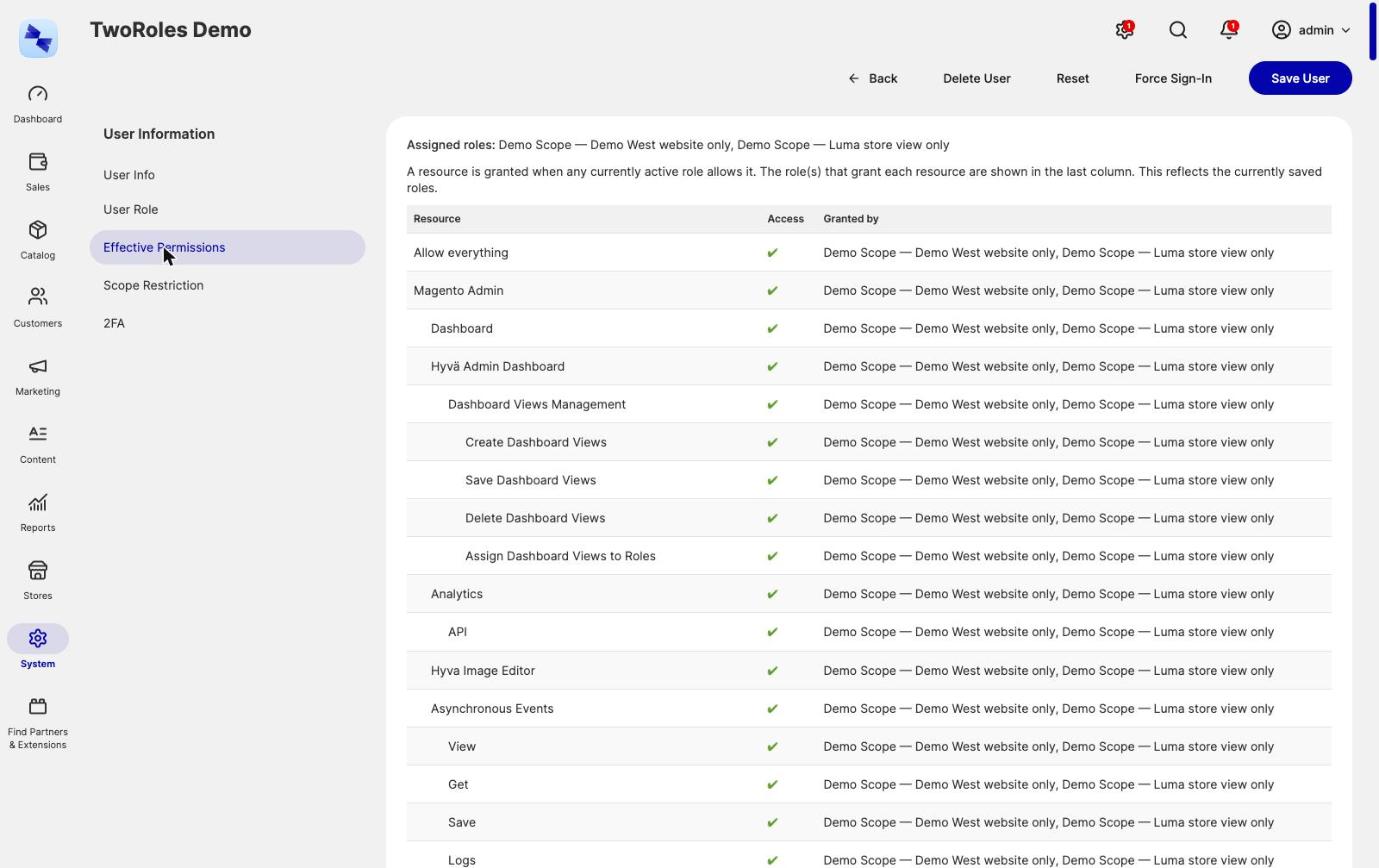
An integration has the same tab at System → Extensions → Integrations → [integration] → Effective Permissions, visible to anyone who can open the integration edit page once the integration has been saved. When the integration has resources ticked on its own API tab, they are listed as an "Own API resources" source next to the granted roles, so you can see which part of the access the integration has by itself and which part a role gave it.
Reading Effective Permissions from the Command Line
The hyva:admin-permissions:effective command prints the same information, which is useful in a deployment check or a scheduled audit:
# Everything the admin user "jane" is allowed
bin/magento hyva:admin-permissions:effective jane

# Allowed and denied resources, for a full picture
bin/magento hyva:admin-permissions:effective jane --all

# The same for an integration, by name or id
bin/magento hyva:admin-permissions:effective --integration=my-erp --all
Without --all the command lists only the resources the identity is allowed. With --all it lists denied resources as well. See the Command Line Reference for the full signature.
Why the Viewer Cannot Drift from What Is Enforced
A view read to decide whether somebody's access is safe must not be able to disagree with what the application actually does. The Effective Permissions viewer is built so it cannot.
Every resource is put to Magento's own Magento\Framework\Authorization::isAllowed() with the role set pointed at the identity being inspected. The verdict you see is the real permission check's own answer, produced by the same plugin chain that guards the controllers: the union across roles, deny-wins for negative roles, lapsed grants, and anything a project of yours adds on top. There is no second implementation of those rules to keep in step by hand.
What the viewer adds on top is attribution: which role covers each resource, read from the same per-role index the permission check consults.
Use it before you hand out a role
Permission Guardrails refuses a grant when the role reaches further than the acting admin does. If a grant of yours is refused, open your own Effective Permissions tab and compare it against the role you were trying to assign - the resource you're missing will be in the difference.
What the Viewer Does Not Show
The Effective Permissions viewer covers ACL resources: what an identity may do. It does not show scope restriction: where they may do it.
To check a user's website or store view restriction, open their Scope Restriction tab, or run:
with no options, which prints the current state. See Website and Store View Restriction.
Related Topics
- Multiple Roles per Admin User - the union and the negative roles this viewer resolves.
- Permission Guardrails - why you would check your own effective permissions.
- Website and Store View Restriction - the other half of what an admin can reach.
- Roles for Integrations - the integration version of this tab.