Refunding to Store Credit
A credit memo can send money back to the customer's store credit balance instead of, or alongside, refunding the payment method. Store Credit adds two fields to the credit memo form for this, and gates the more generous cases behind their own permission.
The Refund Fields on a Credit Memo
Start a credit memo the usual way from Sales → Orders, open the order, and click Credit Memo. Store Credit's fields sit with the refund totals at the bottom of the form.
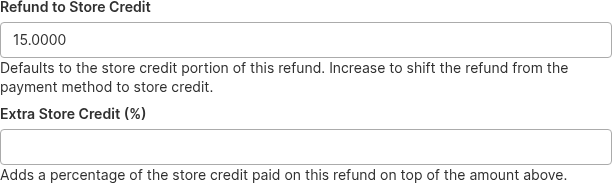
Refund to Store Credit is pre-filled with the store credit portion of this refund, which is the sensible default: an order that was half paid with credit returns that half to credit and the rest to the payment method, without you doing anything. Change the figure to shift more of the refund onto store credit and correspondingly less onto the payment method.
Extra Store Credit (%) is a shortcut rather than a separate refund. It adds a percentage of the store credit paid on this refund on top of the amount in the field above, which saves working out "the credit they paid plus 10% goodwill" by hand.
Submit the credit memo as normal. When it saves, Store Credit writes a Refunded entry to the ledger and the customer's balance goes up immediately.
Shifting a Refund onto Store Credit
You can refund more to store credit than the customer originally paid with credit, as long as you stay within the total value of the credit memo. This is the ordinary "give them credit instead of putting it back on the card" case, and it needs no special permission beyond Refund to Store Credit.
Say a customer paid €118.00 for an order, €18.00 of it with store credit. Refunding the whole order gives you a credit memo worth €118.00, and you can put anywhere from €0.00 to €118.00 of that onto store credit. Set it to €118.00 and the customer gets the full amount as credit and nothing back on their card.
Refunding Above the Credit Memo Value
Going beyond the credit memo's total value is a different matter, because you are handing out credit the order never accounted for. That requires the Hyva_StoreCredit::refund_over_value permission, shown as Refund to Store Credit Above Order Value in System → Permissions → User Roles. Without it, submitting the memo fails with an error and nothing is written.
Because it is easy to do this by mistake with a stray keystroke, the form asks you to confirm before submitting a refund above the order value, and tells you what percentage over you are going.
Two Permissions, Two Different Jobs
Grant Refund to Store Credit to anyone who handles returns. Keep Refund to Store Credit Above Order Value with a smaller group, since it is the one that can create credit out of nothing.
Why a Refund Might Be Refused
- "You are not allowed to refund to store credit." The admin role is missing
Hyva_StoreCredit::refund. Nothing was written. - "You are not allowed to refund more store credit than the total of this credit memo." The amount exceeds the credit memo's value and the role is missing
Hyva_StoreCredit::refund_over_value. Lower the amount or have the permission granted.
Refunds Are Written Once
The refund entry is keyed on the credit memo's ID, so the same credit memo can never credit the customer twice, even if its save event is replayed. Store Credit also keeps a running base_store_credit_refunded figure on the order, which is what limits how much a later cancellation can revert. See Store Credit Through the Order Lifecycle for how refunds, reverts, and cancellations interact.
Related Topics
- Store Credit Through the Order Lifecycle - invoicing, cancellation, and the return ceiling that limits refunds.
- Managing Store Credit Balances - crediting a customer directly, without a credit memo.
- Balance Change Emails - the email the customer gets when a refund lands.