Linked Products on the Storefront
On the Hyvä storefront, Linked Products adds a row of swatches for each link attribute to the product page of every grouped product. Each swatch is a plain link to another product in the same Linked Product Group, so switching color or size opens that product's own page, with its own images, price, stock, and reviews.
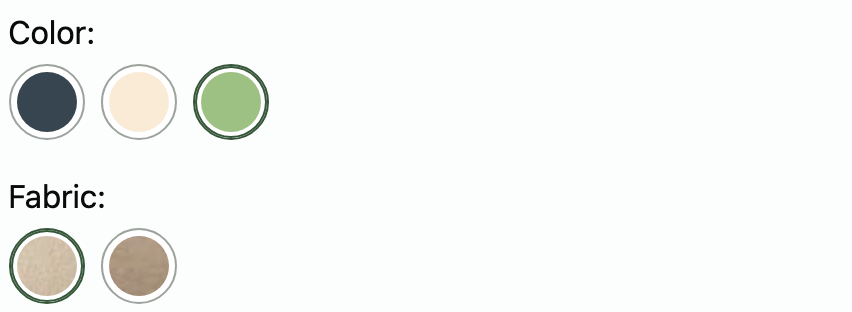
How Linked Product Swatches Look
The swatches appear above the product options and the Add to Cart button, with the attribute's store label as a heading, such as Color:. The swatch for the product being viewed is highlighted. Values follow the attribute's option order.
How each value renders depends on the attribute's catalog input type:
- Visual Swatch with a color renders the color.
- Visual Swatch with an image renders the swatch image.
- Visual Swatch without a value renders the linked product's Swatch image, or its Base image when it has none.
- Text Swatch renders the swatch text.
- Dropdown renders the option label as a text swatch.
Swatch images and colors use the swatch_image size from your theme's etc/view.xml. Hyvä 1.5 sets it to 30 by 30 pixels. Earlier Hyvä themes don't set it, so Magento's default of 30 by 20 pixels applies.
Which Products Appear as Linked Product Swatches
A group member appears on its siblings' pages only when the current store would show it anyway. The member must be:
- enabled;
- visible in Catalog, Search, or Catalog, Search;
- assigned to the current website, and processed by the catalog indexers;
- in stock, when Display Out of Stock Products is set to No (the Magento default).
A product with no other members to show, or a group without link attributes, renders no swatches at all.
Where Each Linked Product Swatch Links
Linked Products picks the target of every swatch by looking for the member that matches the swatch's value and keeps the current product's other values. On the Sage / Bouclé armchair, the Cream swatch links to Cream / Bouclé, and the Linen fabric swatch links to Sage / Linen.
When no member has that exact combination, the swatch links to the closest match: the member with the swatch's value that shares the most other values with the current product. Closest-match swatches have a dashed border, so shoppers can tell the switch changes more than one attribute. When several members match equally well, the one with the lowest product ID wins. That rule is why members with identical values can become unreachable.
Linked Products with Configurable Products
A configurable product can be a member of a Linked Product Group. Its own options, such as size, still render on its page, and Linked Products moves them below the linked swatches. For example, link one configurable product per color by Color, and let each one keep its sizes as configurable options.
Linked Products with Scheduled Updates
On Adobe Commerce, the product page shows linked products in the version that is active or being previewed, so a staged name, image, or status change shows on the swatches too. The group itself isn't staged. See When the Product Edit Page Doesn't Change a Group.
Related Topics
- Configuring Linked Products - turn the swatches off for a website or store view.
- Customizing the Product Page Output - move, restyle, or override the swatches in your theme.